Stock, barcodes & labels
Stock that moves with every bill, job card and sale.
Parts are counted, phones are tracked one by one by IMEI, and goods with an expiry are kept by batch. Load your opening stock from a sheet, scan barcodes at the counter, print labels for what came in, and count the shelf when the numbers drift.
Tracking
5 ways
Qty, IMEI, serial, batch, expiry
Opening stock
From Excel
Checked before it applies
Shelf count
Approved
Nothing changes until then
Labels
40×20 & 50×25 mm
Thermal label printer
What is inventory software for a repair shop?
Inventory software keeps count of what is on the shelf — spare parts, accessories, phones — as it is bought, used on repairs and sold, so the shop knows what it has, what is running low and what the stock is worth. In Kiwikit a purchase bill adds stock, a part on a job card or a counter sale takes it out, phones are tracked by IMEI, and a shelf count corrects the system once a manager approves it. Items are scanned by barcode at the counter and labelled on a thermal label printer.
Updated
Built for a repair counter
Parts, phones and accessories, each kept the right way
A screen guard is counted, a phone is tracked by its IMEI, a battery batch has an expiry. Each item says how it is kept, and the stock follows from the bills you already make.
Items the way you stock them
By quantity, IMEI (two for a dual-SIM phone), serial number, batch, or batch with expiry. Versions by colour or storage each get their own price, barcode and opening stock. Set the MRP, a low-stock alert level, pack size for buying, and a price staff cannot sell below.
Phones by IMEI
Scan each phone's IMEI on the purchase bill. At the counter, scanning an IMEI picks that exact phone; one that is not on the shelf tells you why — sold on which invoice, sent back, or never bought in.
Opening stock from Excel
Paste item, quantity and rate straight from your sheet, or upload a CSV. Kiwikit shows what will change, what is already correct and what it cannot read before anything is saved. Items themselves can be imported from Excel or CSV too.
Shelf counts with approval
Count everything, some categories or chosen items. The system quantity is hidden while you count; scan with the phone camera, pause and resume. A manager sees the differences and approves — stock sold after an item was counted is kept.
Barcode scanning and GS1
Scan the box's EAN/UPC barcode into the item, or generate one. Ring up a sale by scanning a barcode, an item code or an IMEI. GS1 codes are read for the item, batch and expiry date.
Thermal barcode labels
A 40×20 mm barcode label with a QR code, item name, code, price, and batch and expiry for batch items; a 50×25 mm product label with the MRP struck through beside the selling price. Print every label on a purchase bill at once — each phone with its own IMEI.
Inside the software
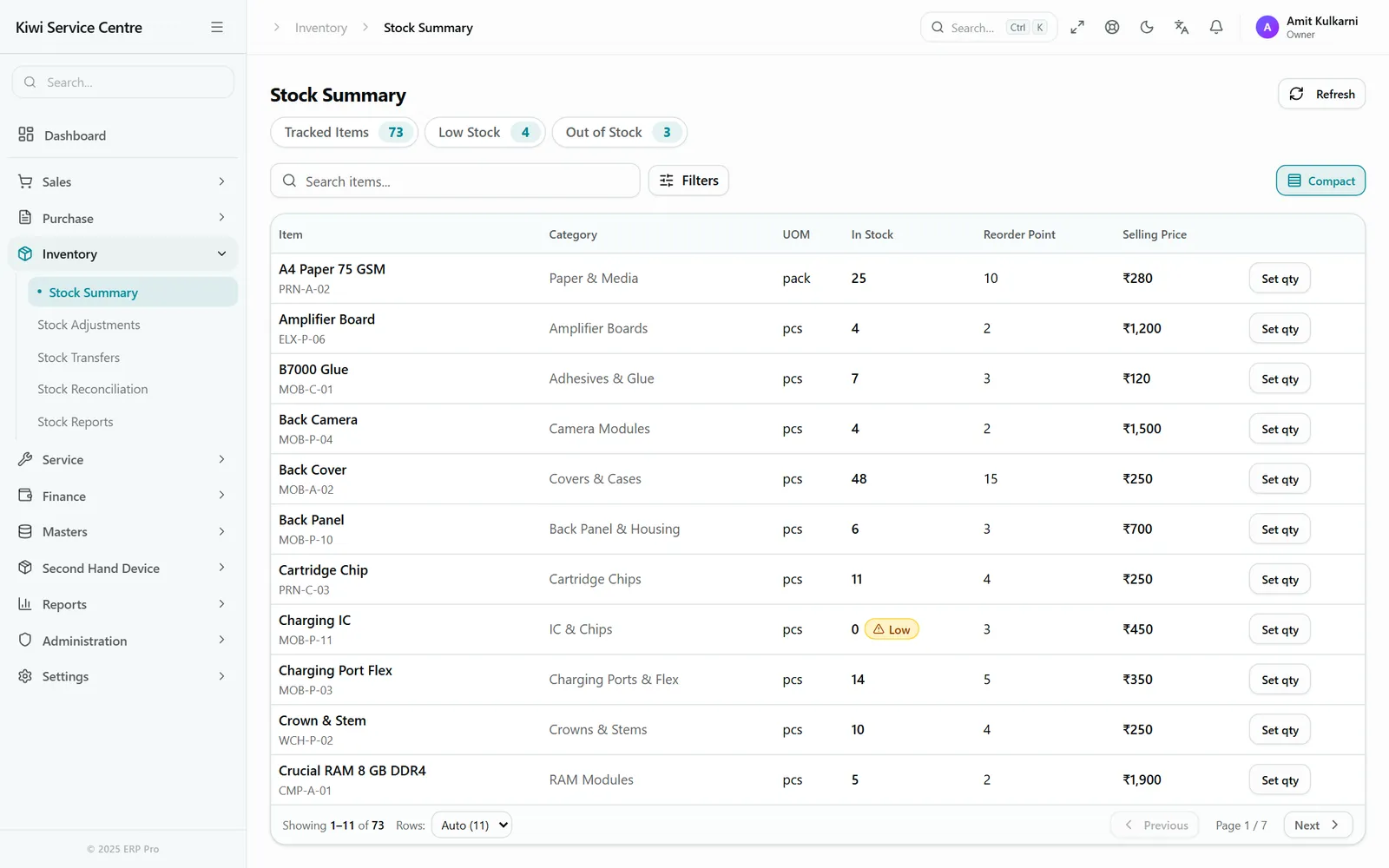
The Stock Summary
Tracked, low-stock and out-of-stock counts across the top double as filters. Every item shows what is on the shelf, its reorder point and price, with Set qty one tap away.
A real Kiwikit screen on a sample shop with made-up items.
Reports
What your stock is worth, and where it went
Stock Reports has two views. Stock value lists what is on the shelf at cost — the average you paid, or the item's master price where nothing was paid — and calls out units whose cost was never recorded. Movement shows opening, in, out and closing for any date range.
The Stock Summary counts tracked, low-stock and out-of-stock items, and low stock also shows on the dashboard. A company setting decides whether stock may go below zero: stop it, and a sale, job card part or transfer is refused when there is not enough.
For goods kept by batch, the Batches screen lists every batch earliest expiry first, with filters for expiring soon, expired, and stock from before batches were switched on that still needs putting into one.
How it works
Set it up once, then let the bills move it.
- 01
Items
How each item is tracked, its price, MRP and alert level.
- 02
Opening stock
Paste from Excel or upload a CSV; check, then apply.
- 03
Buy
A purchase bill adds stock; print its labels.
- 04
Use & sell
Job card parts and counter sales take it out; scan to bill.
- 05
Count
Count the shelf; a manager approves the differences.
An honest read
What it does not do
- A separate serial-number list and a stock-movement log are not built yet — IMEI and serial pieces are still followed through purchase, sale and repair.
- Each self-serve account keeps its stock in one location. Talk to us if you hold stock in more than one place.
- Kiwikit is cloud-based; there is no offline desktop version.
Price
In every plan, nothing extra
- ₹1,499 for three months or ₹4,999 for a year
- 4 users and one shop location included
- 3-day free trial with every feature switched on
Full breakdown on the pricing page, and everything else Kiwikit does on the features page.
Frequently asked questions
Questions about inventory software
Can I manage mobile shop stock by IMEI?
Yes. Set a phone item to be tracked by IMEI — two for dual-SIM — and scan each IMEI on the purchase bill. Scanning an IMEI at the counter sells that exact phone, and any IMEI can be searched to see where it went.
How do I enter my opening stock?
On Stock Adjustments, paste item, quantity and rate from Excel or upload a CSV (a template is provided). Kiwikit previews what will change before you apply it, and rows it cannot read are skipped and listed so you can fix them.
Does Kiwikit work with a barcode scanner?
Yes. A USB or Bluetooth scanner types into the scan box on the sale screen, which reads item barcodes, item codes, IMEIs and GS1 codes carrying batch and expiry. The phone camera can also scan a barcode into an item and during a stock count.
Can I print barcode labels on a thermal printer?
Yes. A 40×20 mm barcode label and a 50×25 mm product label come ready, and the Bill & Label Designer lets you change them. Labels print through the browser or Kiwikit's print agent, and a purchase bill's labels can be printed in one go.
How do stock counts work?
Start a count for all items, some categories or chosen items. Staff count with the system quantity hidden, then submit. A manager sees each difference and approves; only then does stock change. Items not counted are left as they are.
Does stock go down automatically when a part is used on a repair?
Yes. A part added to a job card takes it out of stock and so does a counter sale. A purchase bill brings stock in, and a sales return puts goods marked good back on the shelf.
Is inventory an extra module?
No. Stock, shelf counts, batches, barcodes and labels are in every plan — ₹1,499 for three months or ₹4,999 for a year.
Know what is on your shelf without counting it every day
3-day free trial with every feature switched on. Stock by IMEI, batch or quantity, barcode billing and labels. No credit card required.