Digital Job Card & Jobsheet Software
Create digital job cards. Never lose track of a repair.
Replace paper register notebooks and sticky notes with structured digital job cards. Capture IMEI history, accessories received, technician assignments, WhatsApp status alerts, and thermal barcode labels in one seamless flow.
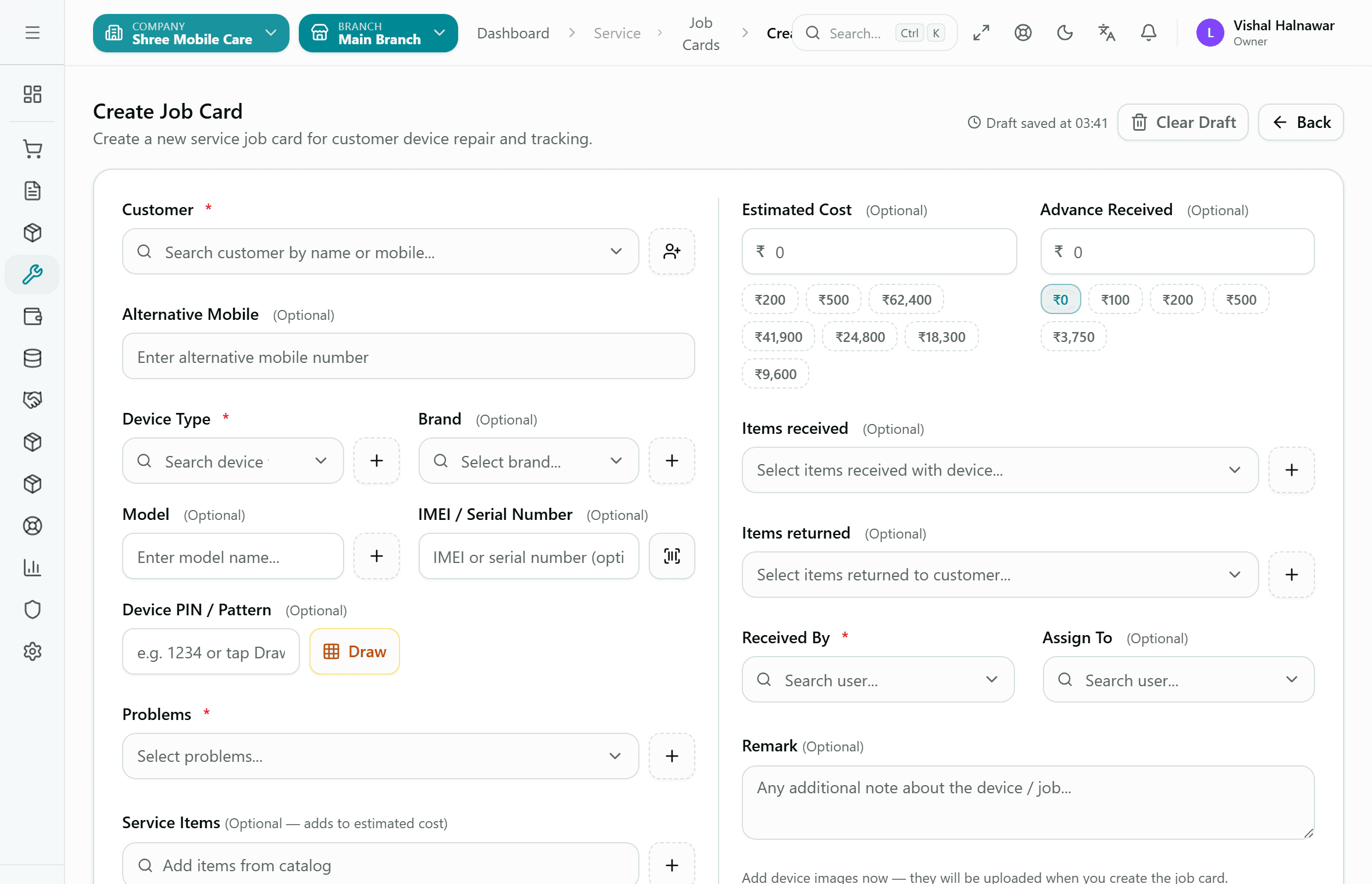
Real Kiwikit Create Job Card interface — customer details, IMEI identifier, complaints, estimated cost, advance, and accessories.
The Repair Lifecycle
How a repair moves through Kiwikit
A repair is not just an invoice — it is an active multi-day process. Kiwikit follows the actual shop counter workflow from drop-off to pickup.
Counter Intake & Device Details
Record customer details, device brand, model, and 15-digit IMEI or Serial Number. Note reported problems, customer lock pattern, and accessories handed over (charger, bag, SIM tray).
Technician Assignment & Queue
Assign the job card to a specific technician. The device appears immediately on that technician's queue with job priorities, intake photos, and technician diagnostic notes.
Live Status & Automatic WhatsApp
Move the job card across 9 clear stages (Pending, In Queue, In Progress, On Hold, Tech Completed, Ready for Delivery, Delivered, Closed, Cancelled). WhatsApp messages with a private tracking link trigger automatically.
Thermal Billing & Delivery
Generate professional GST or non-GST bills. Deduct advance collected at intake, print 2-inch or 3-inch thermal receipts, record warranty dates, and close the job card in one click.
Job Card Features
Engineered for busy Indian service counters
Every field on the Kiwikit job card exists because real counter technicians asked for it.
IMEI & Serial Number Search
Type 15 digits of an IMEI or serial number to pull up repeat repair history instantly. Know every previous screen fix, past complaints, and warranty status before touching the phone.
Accessories Checklist
Record exactly what came with the device — charger, data cable, SIM tray, memory card, or protective case. Prevent disputes at delivery counter.
Intake Condition Photos
Capture photos of existing scratches, dented chassis, or cracked back glass upon arrival. Both the customer and technician have proof of intake condition.
Thermal Receipts & Device Barcode Labels
Print 2-inch or 3-inch thermal intake slips for customers and stick a compact barcode sticker directly on the device so it never gets mixed up in the workshop.
Automated WhatsApp Status Updates
When the job card moves from 'In Progress' to 'Ready for Delivery', an automated WhatsApp notification triggers with the total amount and a private tracking link.
Nine Clear Workflow Stages
Keep the whole team aligned: Pending, In Queue, In Progress, On Hold, Tech Completed, Ready for Delivery, Delivered, Closed, and Cancelled.
Paper vs Digital
Why paper registers slow down your repair business
Writing job entries in notebooks might feel simple, but it wastes hours every week when customers call to check status or return for warranty claims.
| Workflow Feature | Paper Register / Notebook | Kiwikit Digital Job Card |
|---|---|---|
| Search Past History | Flipping through old paper register notebooks | Instant lookup by IMEI, Serial, Job ID, or Phone Number |
| Customer Status Updates | Customers call 5-10 times daily to ask 'Is it ready?' | Automatic WhatsApp updates at every stage + live tracking link |
| Device Mix-Ups | Masking tape handwritten notes that peel off or blur | Thermal barcode label stickers attached directly to the back panel |
| Accessories Disputes | Arguments over whether a charger, cable or SIM tray was given | Digital accessories checklist & intake photos on the job card |
| Technician Accountability | Unclear who handled which repair or parts used | Clear technician assignment, parts cost, and profit per job |
Frequently Asked Questions
Common questions about digital job cards
What details are recorded on a Kiwikit job card?
A Kiwikit digital job card captures customer contact information, device brand and model, IMEI or serial number, problem complaints, estimated repair cost, advance payment, accessories received (e.g., charger, SIM tray, bag), intake condition photos, and assigned technician.
Can I print thermal receipts and barcode stickers for devices?
Yes. Kiwikit supports standard 2-inch and 3-inch thermal POS receipt printers as well as thermal barcode label sticker printers. You can print a receipt for the customer and stick a small barcode label directly onto the back of the device.
Can customers check repair status using the job card?
Yes. Every job card includes a private customer tracking link sent automatically via WhatsApp. Customers can check real-time repair progress, estimated cost, and balance without calling your counter.
How does repeat repair search work with IMEI?
When a customer returns with a device, enter the 15-digit IMEI or serial number. Kiwikit instantly displays the entire repair history: previous complaints, past technician notes, replacement parts used, and warranty status.
Looking for specialized repair solutions?
Explore our specialized Mobile Repair Shop Software and Laptop Repair Shop Software, or view simple plans on our Pricing page.
Start managing repairs with digital job cards today
14 days free trial with all features enabled. Unlimited job cards, IMEI history, thermal printing, and WhatsApp alerts. No credit card required.