Branches, stock & transfers
Every branch of your business on one login.
A second branch should not mean a second system, a second password or a drive across town to see how the day went. Each branch keeps its own stock and bills; you see all of them, side by side.
Branches
One login
Switch from the top bar
Stock
Per branch
Branch-wise view side by side
Transfers
With challan
Sent, on the way, received
GST
Own GSTIN
A branch in another state
What is multi-branch software?
Multi-branch software runs more than one shop of the same business on one system: each branch keeps its own stock, staff, job cards and bills, while the owner sees every branch together and can compare them. In Kiwikit you switch branches from the top bar, move stock between branches with a delivery challan, send a device to another branch for repair, give a branch in another state its own GSTIN, and compare sales, profit, service and stock branch by branch.
Updated
Built for more than one counter
Each branch on its own, the business as one
Branches share the customers' history, the item list and the owner's view, and keep their own stock, staff, job cards and bills.
One login, every branch
Change branch from the top bar and the whole screen follows. Job cards, customers' bills, payments and reports belong to a branch — staff see theirs, the owner sees all of them.
Each branch its own stock
A purchase bill says which branch and warehouse received it, a shelf count is done warehouse by warehouse, and the stock page shows this branch or every branch side by side. Scanning a piece that sits in another branch says so at the counter.
Stock transfers with a challan
Send stock to another branch, see it on the way and receive it there, with a delivery challan to print and the e-way bill details typed in. Short or damaged goods go back to the sender or are written off, and a branch that is short can ask another for stock.
Repairs sent to another branch
Send a job card's device to the branch with the right technician or tools. That branch works the job; the device comes back, and the branch that took it in delivers and bills it to the customer.
A GSTIN per branch
A branch registered in another state bills under its own GSTIN, so its bills carry that state's registration.
Racks and bins
Give each item its place in a warehouse — zone, rack, shelf and bin. The job part picker and the sale's scan box show where to find it.
Inside the software
Branch Comparison
Every branch in its own column with a total: sales, profit, service work and stock for this month, last month, the quarter or the year.
A real Kiwikit screen on a sample shop with made-up items.
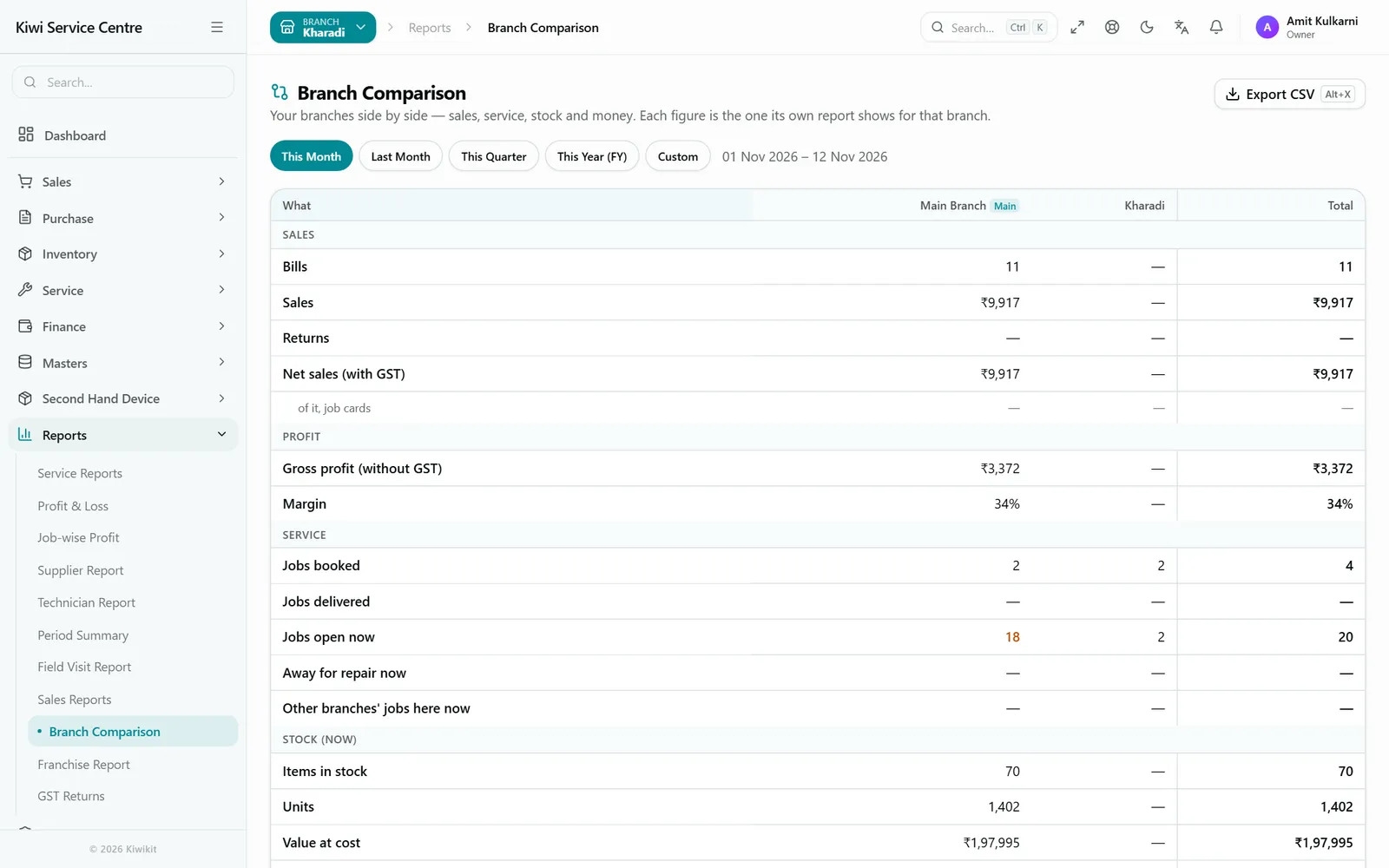
Branch comparison
Which branch is ahead, and which needs a look
The Branch Comparison report puts the branches side by side for any period: sales, profit, service work, stock and money, with a total, the branch ahead and the one to watch marked, collections by payment mode and what customers owe. Export it to Excel in one click.
Each person sees only the sections their role may read, so a branch manager can compare branches without seeing the owner's money.
How it works
Add a branch, then let the day's work run.
- 01
Add branch
Name, address and, if it has one, its own GSTIN.
- 02
Warehouses
The branch's warehouses and, if you like, racks and bins.
- 03
Move stock
Transfer opening stock with a challan; receive it there.
- 04
Work
Job cards, sales and purchases in each branch.
- 05
Compare
Branch Comparison for the week, month or year.
An honest read
What it does not do
- Kiwikit does not generate e-way bills; generate one on the GST portal and type its number on the transfer.
- Kiwikit is cloud-based; there is no offline desktop version.
Price
In every plan, nothing extra
- ₹1,499 for three months or ₹4,999 for a year
- 4 users and one shop location included
- 3-day free trial with every feature switched on
Full breakdown on the pricing page, and everything else Kiwikit does on the features page.
Frequently asked questions
Questions about multi-branch software
How much does an extra branch cost?
Every plan includes one branch. Each extra branch costs ₹4,999 a year — on the 3-month plan, ₹1,499 for the 3 months — with every feature. Bought in the middle of a plan, you pay only for the days left. Owners add branches themselves from Settings → Billing.
Can staff see only their own branch?
Yes. Job cards, customers' bills, payments and reports belong to a branch, so staff work in theirs while the owner sees every branch.
How do I move stock between branches?
With a stock transfer: send it from one branch, it shows as on the way, and the other branch receives it — counting what arrived. A delivery challan prints from the transfer.
Can a branch in another state have its own GSTIN?
Yes. A branch registered in another state bills under its own GSTIN.
Can I compare branches?
Yes. The Branch Comparison report shows sales, profit, service work, stock and money for each branch side by side, with a total, and exports to Excel.
Open your next branch without opening a second system
3-day free trial with every feature switched on. Stock per branch, transfers with challan, a GSTIN per branch and one owner's view. No credit card required.